

Copilot Cowork is Microsoft’s agent-based capability for delegating defined work to AI-powered agents. For MSPs, the important point is that it behaves less like a standard Microsoft 365 feature toggle and more like a consumption-based service tied to Azure billing.
Cowork has moved from curiosity to live deployment fast. The requests hitting our helpdesk over the past month have followed a pattern: a client wants it, the MSP goes to enable it, and hits two things nobody warned them about. Here’s what to know before you get there.
1) It isn’t just a licence
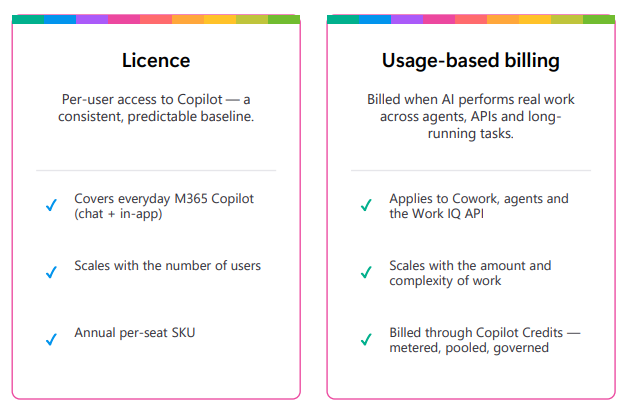
The first surprise is that a Microsoft 365 Copilot licence, on its own, isn’t enough. It’s necessary – Copilot Chat won’t get you there, it has to be the full Copilot licence per user – but Cowork also needs a way to meter Copilot Credits. That means an Azure subscription in the client’s tenant, linked to a spending plan.
If you’re a Manage Protect partner, you don’t create that subscription yourself. Log it with our helpdesk, tell us the tenant and the admin account that will manage it, and we’ll provision it. From there the configuration is yours:
- Assign the admin account the Contributor role on the subscription through IAM.
- Create a resource group under the subscription — name it something obvious like RGCopilotCowork .
- In the Microsoft 365 admin centre, link the subscription and resource group to the Cowork spending plan.
- Apply a spending policy to cap monthly credit consumption.
The most common support call we get on this is “I’ve followed the guide but I can’t see the subscription.” Nine times out of ten it’s the Contributor role, either not assigned or not yet propagated. Wait a few minutes, then refresh.
2) Credits are a consumption charge, not an entitlement
This is the part that reframes the client conversation. Copilot Credits are Microsoft’s cross-surface currency for agent work: Copilot Studio, Copilot Chat agents, SharePoint agents, the Retrieval API, Cowork and Work IQ all draw on the same meter. They’re priced at USD $0.01 each.
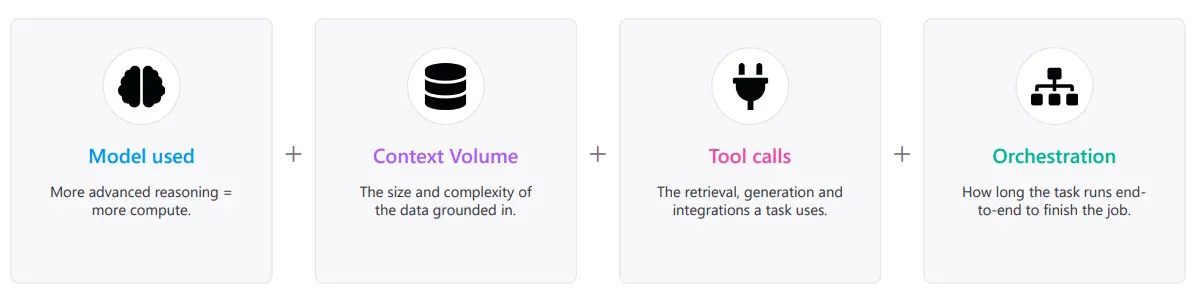
What catches people out is that consumption per task is not fixed. Microsoft calculates it from the model used, how much context was retrieved, how many tool calls were made and how long the run took. A quick summarisation and a multistep research task are not remotely the same cost. That makes forecasting hard, which is exactly why we push a spending cap from day one.
It’s also worth being blunt with clients on one point: there is no rollover, under any model. Pay-as-you-go has no pool to carry forward. Capacity packs reset monthly and unused credits are lost. Pre-purchase credits last the year and expire at term end.
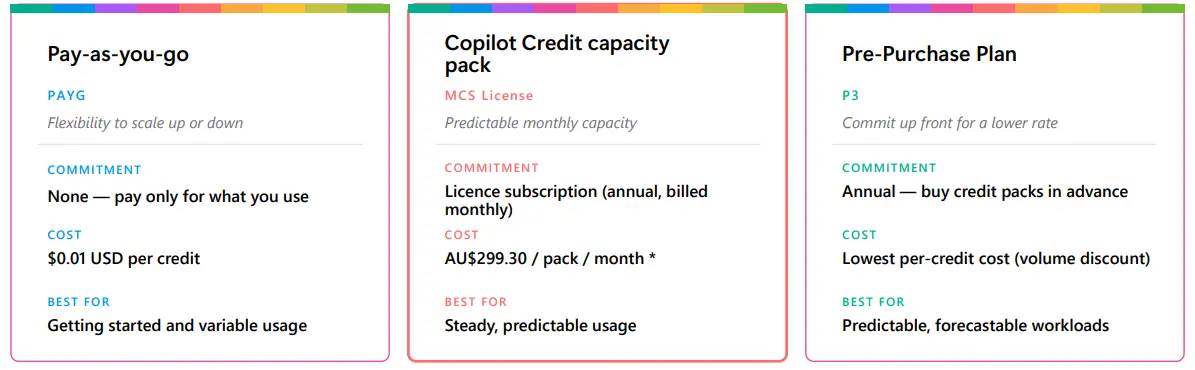
The three ways to buy credits
Pay-as-you-go bills actual consumption only. It’s the right starting point for anyone whose usage isn’t yet understood.
Copilot Studio capacity packs are a source of confusion because of the name. This is a capacity pack, not a user licence. One pack gives the tenant 25,000 credits a month, pooled across all users, resetting monthly. It grants no access a user doesn’t already have – it’s just a cheaper way to buy credits, running around 20% below the equivalent PAYG spend. Nobody needs a Copilot Studio licence to use Cowork.
Copilot Credit Pre-Purchase Plans (P3) are Azure reservations, configured in the admin centre against the subscription. Microsoft publishes them as a discount off the $0.01 rate, from 5% at the entry tier up to 20% at the top. The catch is the entry point: 300,000 credits. The portal displays these in CCCUs – Copilot Credit Commit Units, where one CCCU equals 100 credits, or USD $1 of usage – so the entry tier appears as 3,000 CCCU and looks far smaller than it is. For a single client evaluating the product, P3 is almost never the answer.
If you do go down the reservation path, your admin account needs the Reservation Purchaser role on the subscription, or the portal throws an error when you select the billing subscription.
Our recommendation
Start on pay-as-you-go with a spending policy: 5,000 credits a month is a reasonable evaluation ceiling. Run it for two or three months and build real consumption data. If the client consistently sits above 25,000 credits a month, then cost a capacity pack properly. You’ll be committing against evidence rather than an estimate, and the client gets a predictable number instead of a surprise.
Billing at your end stays simple: the client’s Azure consumption comes through as a single line on your monthly invoice from us, in AUD, and you on-bill from there.
Manage Protect partners can request an Azure subscription for Cowork through the helpdesk. For credit pricing and Azure margin on your account, speak to your Partner Manager.
Suggested reference info:
– Microsoft: Copilot usage-based billing overview
– Microsoft: Getting started with Copilot Cowork
– Manage Protect: Elevating permissions to view Azure subscriptions